
Can a Tiny Plastic Cube Actually Cure Your Doomscrolling?
Let’s be honest with ourselves: native smartphone screen time limits are a bit of a joke. When the alert pops up telling you that you’ve reached your daily Instagram allocation, it takes about 5 seconds to work around it and keep scrolling.
Most apps are pretty much engineered to hijack our attention span, and relying on pure willpower to fight back is a losing battle.
Enter Brick, physical device fdesigned to save you from yourself by replacing fragile digital boundaries with physical friction.
What is the Brick?
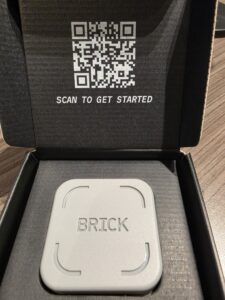
The Brick is a small, cube-shaped piece of plastic that fits snugly in the palm of your hand. It features a grippy silicone base and a strong internal magnet so you can slap it onto your fridge. You can pretty much put it anywhere as long as you remember where you left it (You’ll see why in a moment).
It contains no screen, no ports, and no internal battery to charge. Instead, it utilizes built-in NFC technology to act as a physical “key” to lock and unlock your smartphone.
How It Works
The magic is entirely in the pairing between the hardware and the free companion Brick app (available for iOS 17+ and Android 12+).
-
Create Your Modes: Inside the app, you set up custom profiles based on your day—like Deep Work, Family Time, or Sleep. You can choose exactly which apps or websites to block, or conversely, whitelist only the absolute essentials (like Phone, Messages, and Maps).
-
Tap to Brick: When you want to disconnect, you open the app and tap your phone to the physical Brick device, just like paying for a coffee by tapping your phone.
-
Commit to the Friction: Once “Bricked,” your chosen distraction apps are entirely disabled. Their icons are blocked, and notifications are silenced. To get them back, you have to physically walk back over to wherever you left the Brick and tap it again.
So, if you leave the physical Brick at home and then head out to dinner, you are locked out of those apps until you return. There is no easy “Ignore Limit” button to bail you out.
Putting it to the Test: Dinner Time
This is THE place that you might like to start. Think about how many times during the evening meal where you’ve been tempted to ‘check’ something or you hear a buzz or ping from your phone and immediately grab it to see if it’s something ‘important’.
Now consider how the dynamics change if you tap your phone to the BRICK before dinner, leaving the BRICK at the other end of the house. Distraction eliminated.
That said, it isn’t completely without flaws:
-
The Android/NFC Finickiness: While setup is a breeze, the actual NFC scanning can sometimes be a bit temperamental, particularly on certain Android devices or through thick phone cases. It occasionally took two or three taps to register.
-
The “Tap off”: For me the experience would feel more natural if I didn’t have to open up the BRICK app before tapping to unlock my apps again. This part of the experience isn’t really talked about on the website where the language is more around simply tapping your phone (not having to open the app first).
-
Emergency Anxiety: If you genuinely lose your Brick or face an emergency while away from it, the app grants you five “Emergency Unbricks” total. For some users, knowing there is a hard limit on emergency bailouts maybe cause some anxiety. You can however request for your “Emergency Unbricks” to be topped up.
Is it Worth the Price Tag?
Spending $93 on a small piece of plastic might initially feel like paying a premium for basic self-control. But unlike almost every other digital wellness tool on the market, Brick features absolutely no ongoing subscription fees. It’s a one-off purchase with lifetime app access.
If you struggle with severe doomscrolling habits, or find yourself losing hours of your life to algorithmic feeds, the physical separation this device forces upon you is incredibly effective.
Final thoughts…
The Brick is a brilliant exercise in fighting fire with fire. It uses slick technology to build an unyielding wall against slick technology. While it can’t fix deeply rooted screen habits overnight, it provides the exact physical boundary needed to break the cycle of automatic scrolling.
For anyone looking to reclaim their attention span and turn their phone back into a tool rather than a distraction, the Brick is well worth the investment.